


We can't find the internet
Attempting to reconnect
Something went wrong!
Hang in there while we get back on track
Wiki
Your comprehensive guide to clan resources and information

Guides & Tutorials
Gearscape How-To
Learn how to properly use Gearscape to find the best gear you can use at different PvM content.
🎥 Watch TutorialCredit: Adopt
Inventory Setups Plugin
The Inventory Setups RuneLite plugin lets you save gear and inventory layouts and automatically sort your bank when getting ready for a raid.
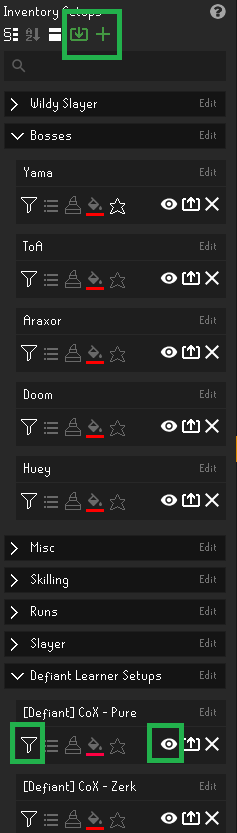
- Install the Inventory Setups plugin from the RuneLite Plugin Hub
- Open the plugin panel in RuneLite
- Click the Import Button at the top of the panel to import a setup
- Click the Filter Button on the left of the setup and the Eye Icon. Both will appear highlighted in white when active. Your bank will automatically sort itself into the setup.
Resources & Info
Clan Rules & Ranks
Review our community guidelines, expectations, and clan hierarchy. Learn about rank requirements, role responsibilities, and how to advance.
📜 View About UsUseful Links
Quick access to external calculators, wikis, and tools. Essential resources for optimal gameplay.